Showing posts with label motherboard. Show all posts

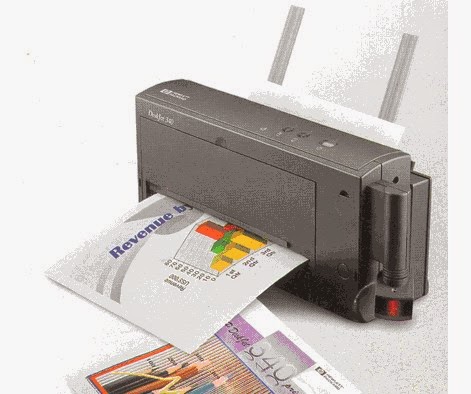
Computer printer buying tips


Computer printer buying tips

Purchasing a printer can be a daunting and sometimes confusing task. Below is additional information that will help in your purchasing decisions.

Technology

The first and foremost important consideration to consider when purchasing a printer is the technology the printer utilizes to print. Today, ink jet and laser printers are the two most popular printer technologies.
Ink Jet - Inkjet printers are an affordable and effective solution for home users and home businesses.
Laser - Laser printers are a recommended solution for businesses or networks that require speed and efficiency, and high quality resolution.
  • Inkjet vs. laser printer.

Resolution

Resolution on a printer is measured by the amount of dots per inch a printer is capable of printing. When looking at purchasing a printer, it is important to look at the DPI the printer is capable of printing.
It is also important to know that some printer manufacturers may generate their own methods through software for increasing their resolution.

Speed

Speed is another important consideration when looking at computer printers. The speed of a printer is rated in PPM, or pages per minute, and rate anywhere between 4 and 10+ PPM, depending on several factors such as if it is Black and White or Color, text only or full page. You should expect a faster PPM from a laser printer printing text than an Inkjet printer.

Ink and Toner

Ink or Toner is an important factor when purchasing a printer. Look at the below characteristics of the Ink and Toner used with the printer.
Price - By far the most important factor is price; if the printer becomes a frequently used device you may find that the price of the ink can far surpass the price of the printer. Look how much the ink will cost when it needs to be replaced.
Availability - From where can the ink or toner be purchased? Some printer manufacturers may require that you purchase the ink directly from them; and if purchased from a third-party, cause your printer warranty to become void. Verify that the ink can be purchased from a third-party and if so, from whom.
Type - See what ink or toner used with your printer, and for users considering an Ink Jet printer, see if the printer accepts separate color cartridges. Some manufacturers may include all the cartridges as one cartridge, causing you to have to purchase all the available colors for one color that may be out. In addition, see if the cartridges are just ink or ink and nozzles. Cartridges with ink and nozzles will cost more than those that have just ink.

Cost per page

Cost Per Page - The measurement of the ongoing price of the printer after its initial purchase. It is important to look at the cost per page and see how much you may be paying for the amount of printing you expect to do. You can expect to pay less for a laser printer than an ink printer when looking at Cost Per Page.

Other considerations

Paper handling - The method of how the printer handles and distributes the paper can be an important consideration when looking at printers. Many Ink Jet printers well feed paper through a slot on the top of the printer, while laser printers will use a tray method of feeding the paper to the printer. Depending upon the amount of printing you expect to have and the paper you plan on using, such as a paper envelope, will help make your decision when purchasing a printer.
Options - When purchasing a printer, look to see if the printer requires additional add-ons that may be required; this can also factor into the overall cost of the printer. These add-ons can include but are not limited to such things as cables, trays, ink, software, etc

Price range

Price range - The price range can vary depending upon the quality of the printer and brand of the printer. Below is a price range of what to expect when purchasing a printer.
Ink Jet Printer: $100 to $400
Laser Printer: $300 to $2,000

Ready to buy

Once you have reviewed the appropriate information and believe that you are ready to make a purchase of a printer, ensure that the source that you plan on purchasing the printer from is a reputable source and you have reviewed our section on what to look out for when purchasing over the Internet.
Computer Hope is ready to setup and help you with issues you may encounter during the purchase or installation of your printer, regardless if you purchase through us or another vendor.
To help support Computer Hope you can purchase directly through our well-known associate, Amazon. Click the below browse button to begin browsing through the printer section.

Computer motherboard buying tips

For users planning on building a computer, a motherboard can be a confusing and sometimes frustrating decision. Below we have listed some considerations and tips when looking at purchasing a computer motherboard.

Type

The type, or form factor, of the motherboard is a crucial consideration when looking at a motherboard. There are various form factors and not all computer cases can accommodate each form factor. Today, the most commonly found and used motherboard is the ATX motherboard. When looking at the motherboard, make sure your case supports your motherboard form factor. Additional information and help with the form factors can be found on our motherboard page
When looking at who to purchase a motherboard through, consider all different brands of motherboards and vendors who sell those motherboards, as all motherboards have positive and negative reviews. A listing of motherboard links and manufacturers can be found on the motherboard section of our network.

Considerations

CPU socket or slo
There are a wide variety of different CPU Sockets and Slots. When looking at purchasing a motherboard, ensure it is compatible with the CPU you have or that it will be compatible with the CPU you plan on purchasing.
Additional information about CPUs and the Sockets or Slots can be found on our CPU buying tips page.
Drive connectors
Drive connectors can be an important consideration when purchasing a computer. Determine the interface of the drives you plan on using, and ensure that the motherboard supports that interface or has the connector for that interface. An example of such an interface is IDE, EIDE or SCSI.
Additional information about hard drive buying tips can be found on our Hard drive buying tips page.
Additional information about CD-ROM buying tips can be found on our CD-ROM buying tips page
Memory slots and type
Today, there is a wide variety of different types and speeds of memory. When looking at purchasing a motherboard, ensure that it is compatible with the memory you currently have or plan on purchasing. 
Additional information about Memory buying tips can be found on our Memory buying tips page.
Slots
The available slots can be an important consideration. Below is a listing of the different slots used in motherboards.
  1. PCI Express - The latest and greatest slot and bus type.
  2. AGP - AGP, or Advanced Graphics Port, is used for video cards as a replacement for PCI.
  3. AMR - AMR, or Audio Modem Riser, is a slot that is used for Audio and Modem cards and is found on some motherboards. This is not a critical slot and has been replaced by the CNR.
  4. CNR - CNR, or Communication and Network Riser, is a slot that supports audio, modem, USB, and Local Area Network cards. This slot is highly recommended for any user building a large amount of computers as the cards are cheaper than the standard PCI or ISA cards.
  5. ISA - Today, ISA is becoming obsolete and is not found on all motherboards. Unless you have old ISA cards that need to be used, it is recommended you purchase a new motherboard with no ISA slots and additional PCI slots.
  6. PCI - The most widely and commonly used slot.
  • Additional information about each of the above computer bus types.
  • Computer video card buying tips page.
  • Computer sound card buying tips page.
  • Computer modem buying tips page
Jumpers
Jumpers are overlooked when considering a motherboard; however, they can be an important consideration, especially for users who plan on overclocking their computer. Below is a listing of some of the jumpers that should be asked about or known when purchasing a computer motherboard.
  1. Does the motherboard have a clear CMOS jumper?
  2. Does the motherboard have CPU settings jumpers? Or is it configured through CMOS? Is it auto detect?
  3. Does the motherboard have onboard video or sound? If yes, can they be disabled with jumper or is it done through CMOS? Note: either way is fine as long as it can be disabled.
USB ports
While all motherboards today have USB ports, ensure that the motherboard you plan on purchasing has USB ports.

Effects

Upgrading and replacing a new computer motherboard may have the below effects on the computer.
  • Speed up the overall performance of the computer. May not be noticeable.
  • Allow for new improved hardware to be added into the computer.

Motherboard installation

Additional help and information about installing a computer motherboard and other computer hardware can be found through our Installation section.

 
Powered by Blogger.